Chapter 9 — ACF and PACF
In previous chapters, we introduced dependence, persistence, and stationarity.
We now develop two of the most important tools in time series analysis:
the autocorrelation function (ACF)
the partial autocorrelation function (PACF)
These tools help us understand:
dependence across time
persistence
lag structure
model identification
Learning Objectives
By the end of this chapter, you should be able to:
understand autocorrelation and autocovariance
interpret ACF and PACF plots
recognize dependence patterns
distinguish white noise and persistent processes
use ACF/PACF for model identification
9.1 Correlation Across Time
In time series analysis, we study relationships such as:
where (h) is the lag.
9.2 Autocovariance and ACF
For a weakly stationary process:
The autocorrelation function (ACF) is:
where (\gamma(0) = Var(X_t)).
9.3 White Noise: No Dependence
Simulation
Source
import numpy as np
import matplotlib.pyplot as plt
from statsmodels.graphics.tsaplots import plot_acf, plot_pacf

np.random.seed(10101)

wn = np.random.normal(0, 1, 300)

plt.figure(figsize=(10,4))
plt.plot(wn)
plt.title("White Noise")
plt.savefig("figs/ch9/wn.png", dpi=300, bbox_inches="tight")
plt.close()   # replace with plt.show()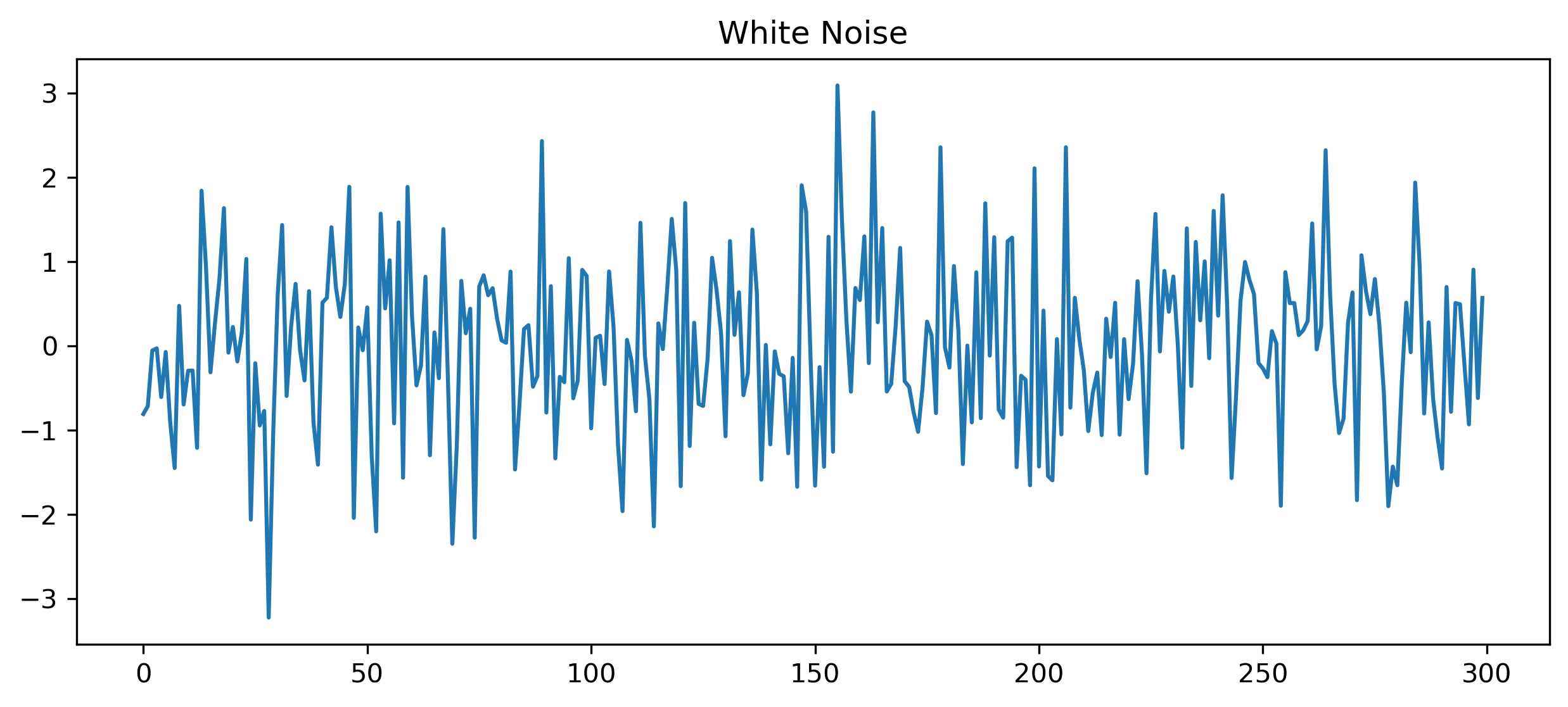
ACF and PACF
Source
fig, ax = plt.subplots(1,2, figsize=(10,4))

plot_acf(wn, lags=30, ax=ax[0])
ax[0].set_title("ACF (White Noise)")

plot_pacf(wn, lags=30, ax=ax[1], method="ywm")
ax[1].set_title("PACF (White Noise)")

plt.savefig("figs/ch9/wn_acf_pacf.png", dpi=300, bbox_inches="tight")
plt.close()   # replace with plt.show()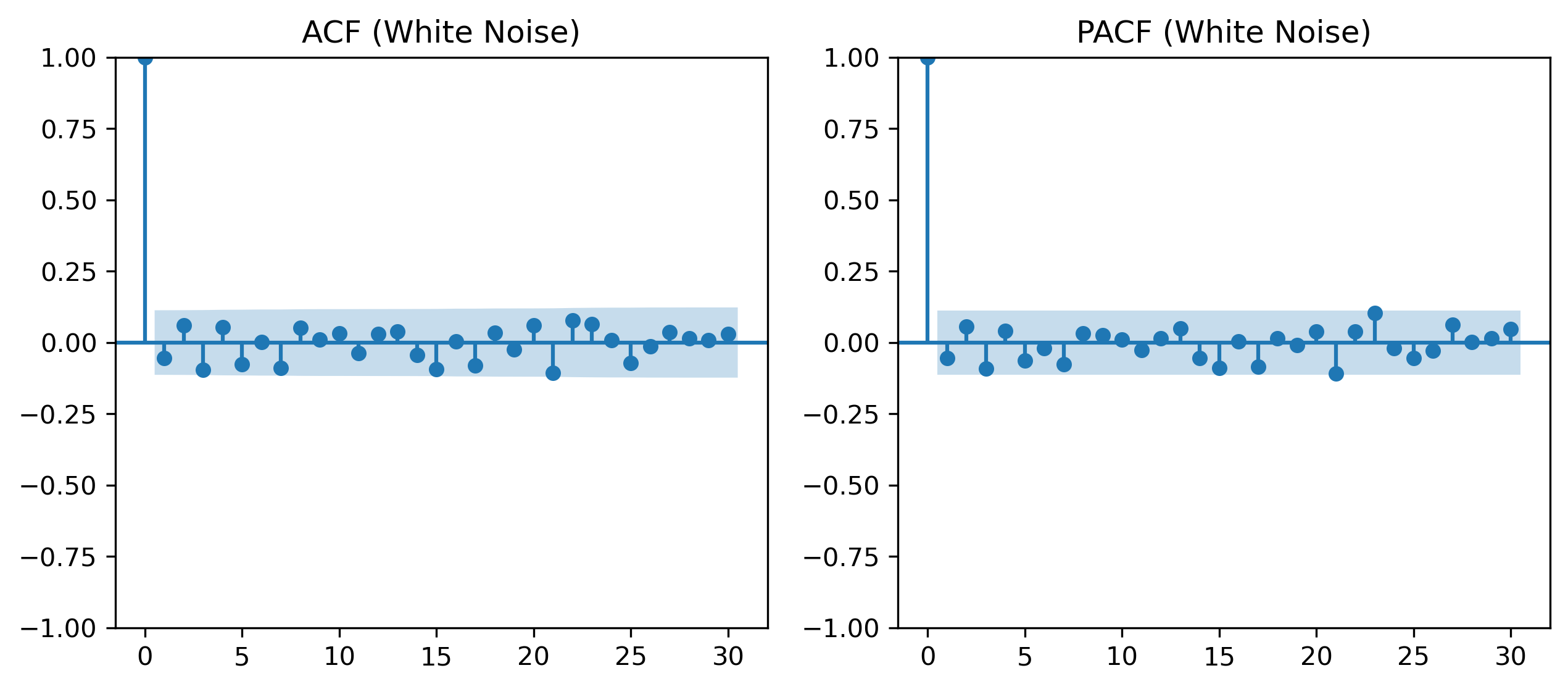
9.4 Persistent Series: Random Walk
Simulation
Source
np.random.seed(123)

w = np.random.normal(0, 1, 300)
x = np.cumsum(w)

plt.figure(figsize=(10,4))
plt.plot(x)
plt.title("Random Walk")

plt.savefig("figs/ch9/rw.png", dpi=300, bbox_inches="tight")
plt.close()   # replace with plt.show()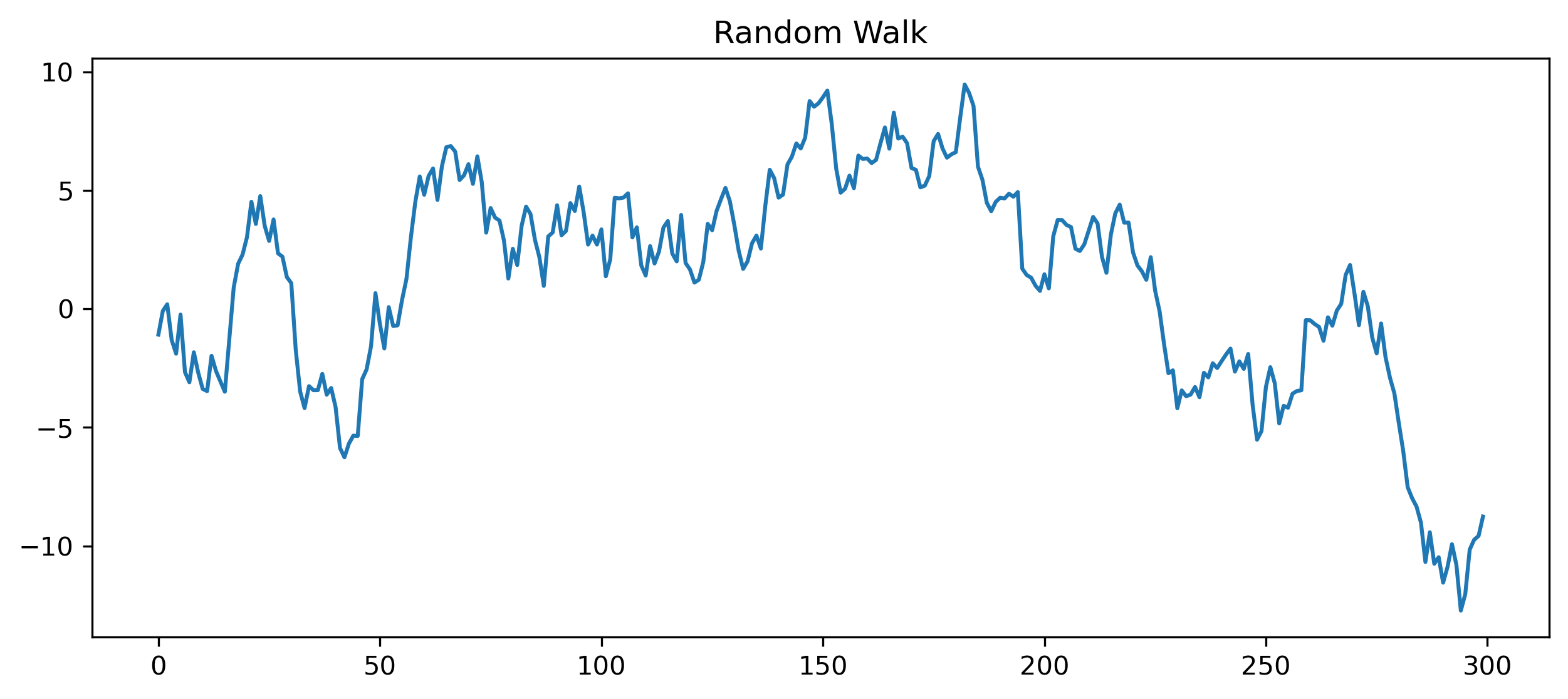
ACF and PACF
Source
fig, ax = plt.subplots(1,2, figsize=(10,4))

plot_acf(x, lags=40, ax=ax[0])
ax[0].set_title("ACF (Random Walk)")

plot_pacf(x, lags=40, ax=ax[1], method="ywm")
ax[1].set_title("PACF (Random Walk)")

plt.tight_layout()

plt.savefig("figs/ch9/rw_acf_pacf.png", dpi=300, bbox_inches="tight")
plt.close()   # replace with plt.show()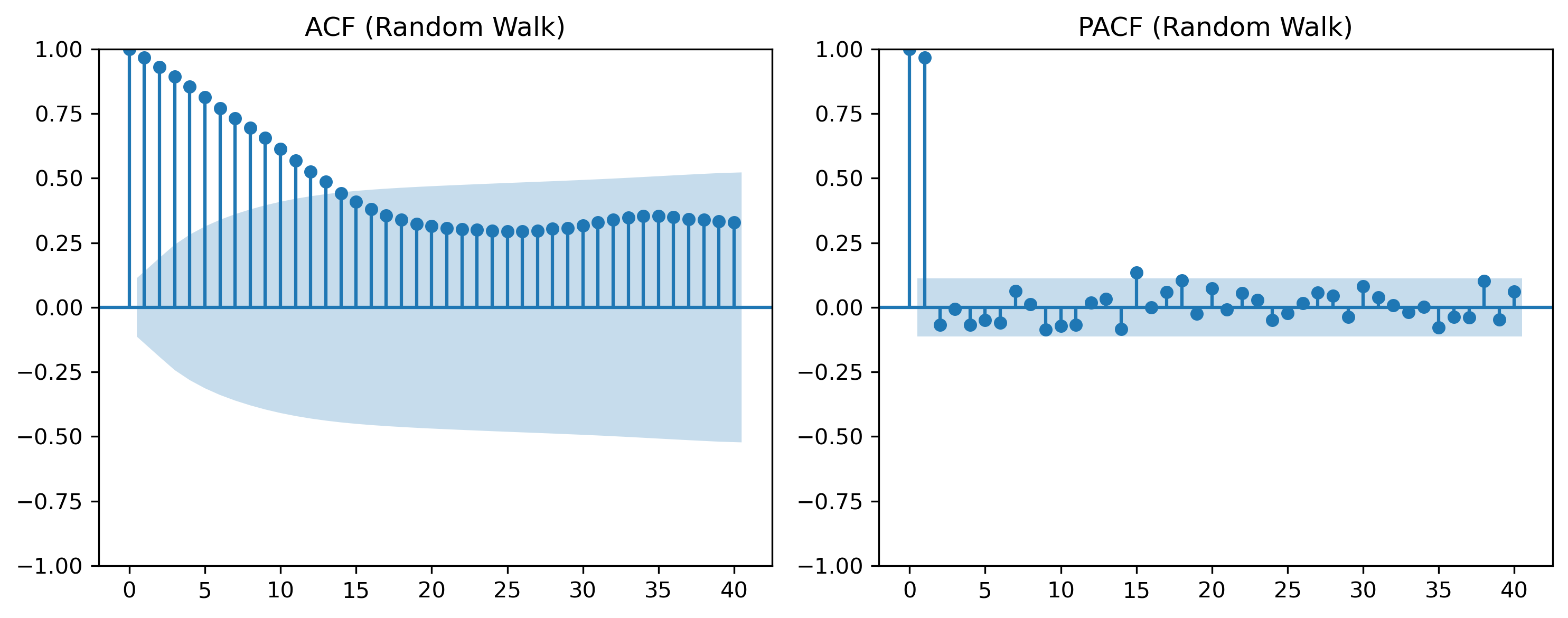
9.5 Interpreting ACF Patterns
White Noise
ACF ≈ 0 at all lags
Persistent Series
ACF decays slowly
Oscillatory Behavior
ACF alternates signs
9.6 Partial Autocorrelation (PACF)
The ACF measures total dependence, including indirect effects.
The PACF isolates direct dependence.
9.7 ACF vs PACF (Intuition)
9.8 Visual Comparison
Source
np.random.seed(42)

# AR(1)
phi = 0.7
ar = np.zeros(300)

for t in range(1, 300):
    ar[t] = phi * ar[t-1] + np.random.normal()

fig, ax = plt.subplots(2,2, figsize=(10,6))

plot_acf(ar, lags=30, ax=ax[0,0])
ax[0,0].set_title("ACF (AR(1))")

plot_pacf(ar, lags=30, ax=ax[0,1], method="ywm")
ax[0,1].set_title("PACF (AR(1))")

plot_acf(wn, lags=30, ax=ax[1,0])
ax[1,0].set_title("ACF (White Noise)")

plot_pacf(wn, lags=30, ax=ax[1,1], method="ywm")
ax[1,1].set_title("PACF (White Noise)")

plt.tight_layout()

plt.savefig("figs/ch9/acf_pacf_.png", dpi=300, bbox_inches="tight")
plt.close()   # replace with plt.show()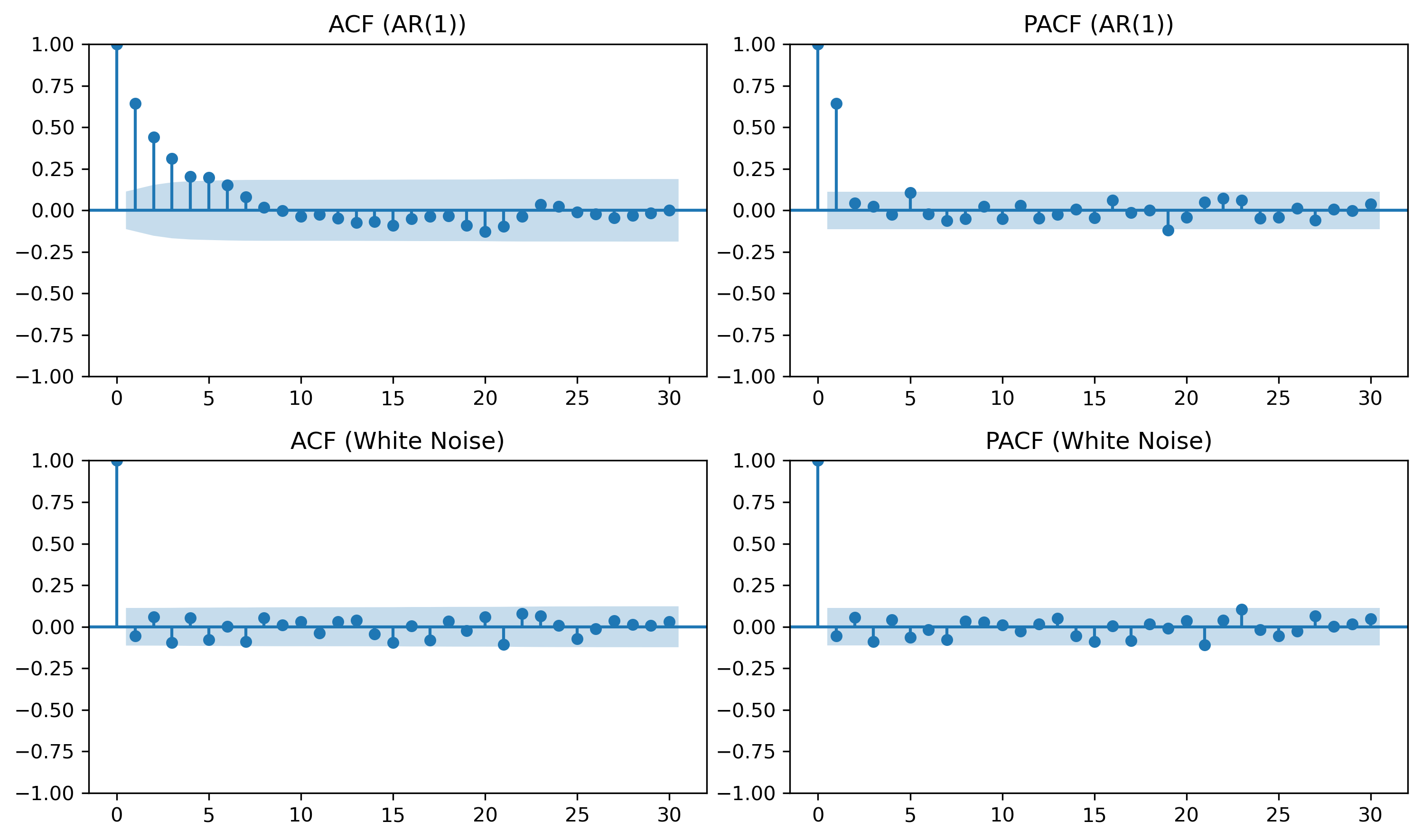
9.9 Model Identification (Rule of Thumb)
| Model | ACF | PACF |
|---|---|---|
| AR(p) | decays | cuts off at p |
| MA(q) | cuts off at q | decays |
| ARMA | decays | decays |
| White noise | none | none |
9.10 Confidence Bands
ACF/PACF plots include approximate bounds:
9.11 Economic and Financial Insight
Macroeconomic variables → persistent
Financial returns → weak autocorrelation
Volatility → highly persistent
9.12 Looking Ahead
ACF and PACF help diagnose dependence patterns.
Next, we study:
unit roots
nonstationarity
differencing
which explain whether persistence is temporary or permanent.
Key Takeaways
Concept Check
Basic
What is autocorrelation?
What does the autocorrelation function (ACF) measure?
What is a lag?
Intuition
Why do we examine correlations across time in a time series?
What does a high autocorrelation at lag 1 suggest?
What does it mean if autocorrelations decay slowly?
Intermediate
What is the difference between:
ACF
PACF
Why is PACF useful in time series analysis?
What does it mean if autocorrelations are close to zero at all lags?
Interpretation
What pattern would you expect in the ACF of:
white noise
a persistent series
Challenge
Suppose the ACF shows strong values at many lags.
What does this suggest about the series?
Why might this indicate nonstationarity?
Interpretation & Practice
ACF values are close to zero at all lags.
What type of process is this likely?
Why?
ACF shows a large value at lag 1, then quickly drops to zero.
What does this suggest about dependence?
What type of process might generate this?
ACF decays slowly over many lags.
What does this indicate?
Why might this suggest nonstationarity?
PACF shows a sharp cutoff after lag 1.
What does this imply?
Why is this useful for model identification?
ACF alternates between positive and negative values.
What type of behavior might this indicate?
What does this suggest about the series dynamics?
Finance Interpretation
A return series shows very low autocorrelation.
What does this imply about predictability?
How does this relate to market efficiency?
A volatility series shows strong autocorrelation.
What does this suggest?
Why is this important in finance?
Challenge
Suppose both ACF and PACF show no clear pattern.
What type of process might this be?
Why is model identification difficult in this case?
Numerical Practice
Identifying Autocorrelation
Consider the following series:
2, 4, 6, 8, 10
Does this series show dependence over time?
Would you expect high autocorrelation?
Why?
Consider:
3, −1, 2, −2, 1, 0
Does this series appear random?
Would you expect autocorrelation to be high or low?
Lag Interpretation
Suppose:
What does this imply?
Is the series highly dependent?
Suppose:
What does this suggest about predictability?
ACF Patterns
Match the pattern:
ACF ≈ 0 for all lags
ACF slowly decays
ACF cuts off quickly
To the likely process:
white noise
persistent series
short-memory process
Challenge
Suppose a series has:
strong autocorrelation at lag 1
weak autocorrelation afterward
What type of model might describe this?
Why?
Appendix 9A — Understanding PACF
The PACF can be interpreted as the correlation between:
and
after removing the effect of intermediate lags.
This can be obtained by:
Regressing on intermediate lags
Regressing on the same variables
Taking the correlation between residuals